Latchkey and Landlord Vision, side by side.
Both help UK landlords keep track of rent, repairs and compliance. This page sets out where each is ahead. Their side comes from Landlord Vision’s public website as of October 2026.
16 rows compared, including the 7 where they’re ahead.
Which one to pick
Pick Landlord Vision if
You want an app from the App Store or Google Play, support by phone, or a bank feed, Xero and Making Tax Digital submission working today. Those are real reasons.
Pick Latchkey if
You want your tenants to sort more for themselves, and the law in England and Wales built into rent, repairs and notices. A bank feed, Xero, referencing and sending updates to HMRC are coming to Latchkey soon.
More of the tenant’s questions answered without you.
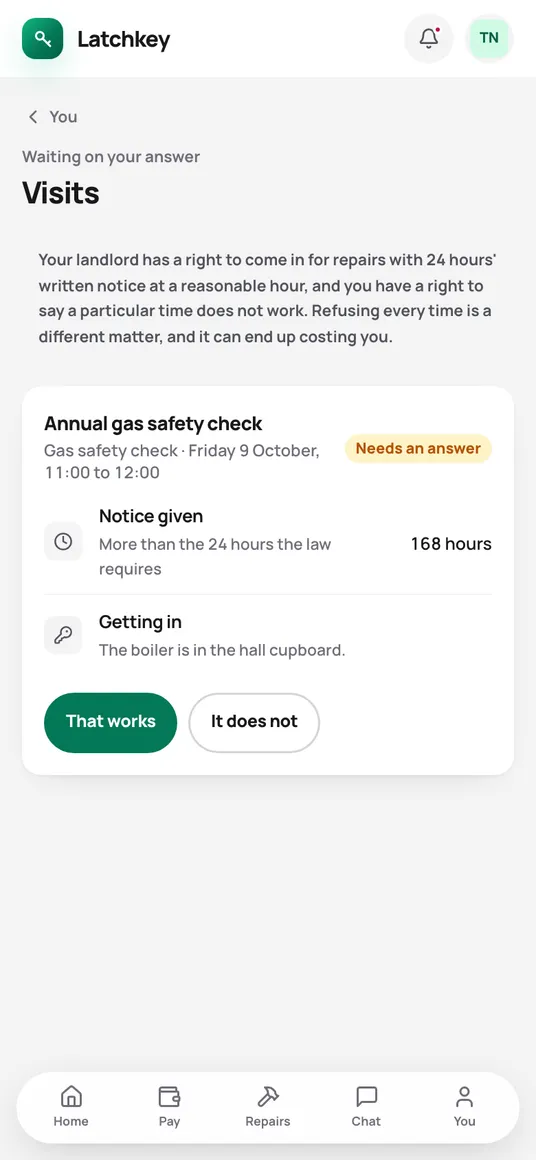
Most tenant portals show a balance and take a repair report. In Latchkey your tenant can also:
- Agree a proposed visit, or ask for another time
- Ask permission for a pet, a lodger or decorating
- Propose a payment plan that clears their arrears
- Answer a rent increase, with their deadline to challenge it
- See how their service charge share was worked out
- Agree the inventory line by line
Each one is a call or text you don’t get, and the answer is kept on the tenancy.
What we didn’t see on their website.
These are part of Latchkey. We didn’t find them described on Landlord Vision’s site, which doesn’t mean they lack them. Ask them if one matters to you.
- Late fees within the law
- Latchkey won’t charge more than the Tenant Fees Act allows, whatever your setting says.
- Every Section 8 problem at once
- The ground, the arrears, the deposit and the licence checked together before you serve.
- Repair deadlines from the report
- Counted from the day the tenant told you, with damp, mould and heating made urgent.
- Repair or improvement
- The form says which a cost is before you save it, so it lands right on your tax return.
- The payment after the fix
- Each mortgage projected past the end of its fixed rate.
- Owners who sign in
- For agents: owners see their own statements, repairs and tax figures.
Where each one stands
Their column is read from Landlord Vision’s public website in October 2026, not from using their product. Partly means Latchkey does some of it today and the rest is coming. If we’ve got something wrong, email hello@latchkey.co.uk and we’ll correct it.
Day to day
7 rows. Landlord Vision ahead on 1, level on 6.
| Feature | Latchkey | Landlord Vision |
|---|---|---|
| Rent tracking and arrears | Yes | Yes |
| A portal for tenants In Latchkey tenants also agree visits, ask permission, propose payment plans and answer rent increases | Yes | Yes |
| Repairs and work orders Latchkey counts each repair’s deadline from the day it was reported | Yes | Yes |
| Certificates and compliance dates | Yes | Yes |
| Tenant referencing Coming soon to Latchkey | No | Yes |
| Signing documents online | Yes | Yes |
| Calendar and tasks | Yes | Yes |
Money and tax
6 rows. Landlord Vision ahead on 4, level on 2.
| Feature | Latchkey | Landlord Vision |
|---|---|---|
| Making Tax Digital Latchkey works out the quarterly figures from your records. Sending them to HMRC from Latchkey is coming soon | Partly | Yes |
| Bank feed Latchkey imports bank statements from a CSV file today. A direct feed is coming soon | Partly | Yes |
| Reading a receipt from a photo | No | Yes |
| Xero Coming soon to Latchkey, with QuickBooks. Until then, download the trial balance | No | Yes |
| VAT | Yes | Yes |
| Statements for owners In Latchkey owners can sign in and see them | Yes | Yes |
Apps and support
3 rows. Landlord Vision ahead on 2, level on 1.
| Feature | Latchkey | Landlord Vision |
|---|---|---|
| iPhone and Android apps Latchkey works in the phone’s browser | No | Yes |
| Phone support Latchkey support is by email, from a person | No | Yes |
| A free trial Latchkey’s is 14 days with no card | Yes | Yes |
Judge it on the screens.
Every screen in both apps is on this site, taken from the app itself. Or start the trial and set up your own lets.
No card needed. Cancel from Settings.